
 Luke Cavanagh
 Central processing units (CPUs) have long been the cornerstone of computational power, driving personal computers, servers, and many electronic devices. That fact stated, with the accelerating growth trend of artificial intelligence (AI) and the increasing complexity of web hosting platforms, graphics processing units (GPUs) have emerged as a formidable counterpart, challenging the dominance of CPUs.
This article delves into the comparative roles of GPUs and CPUs in the context of AI and web hosting, exploring their respective strengths, weaknesses, and the scenarios where each excels.
Top takeaways found in this article
Upon reading this explanation of CPU vs GPU, you will better understand the following concepts:
- Architectural and functional differences to note when assessing GPUs vs. CPUs
- The versatility of CPUs
- Parallel processing strength of GPUs
- AI workloads and the reign of GPUs
- Web hosting platforms where CPUs are still ideal
- Next wave of innovation related to the combination of CPUs and GPUs
- The future — emerging trends and technologies
- Real-world scenarios where GPUs can be used
- Appreciating the value of both GPUs and CPUs
Do you need a graphics card for a web server? If so, why?
Are you examining the differences when it comes to CPU vs GPU in terms of speed and performance on your server? Are you wondering why you need a graphics card for a web server? For a good primer on the subject, check out this post describing GPUs in depth:
More and more, web application managers are adding graphics cards with GPUs on them to their servers. And the numbers don’t lie — CPU has a high cost per core, and GPU has a low cost per core. For about the same investment, you could have a few additional CPU cores or a few thousand GPU cores. That’s an illustration of the power of GPUs.
CPU vs GPU — about the core differences in architecture and function
It is essential to grasp the fundamental architectural differences to understand why GPUs and CPUs are suited for different tasks. Let’s look closer at each technology.
CPUs are versatile powerhouses
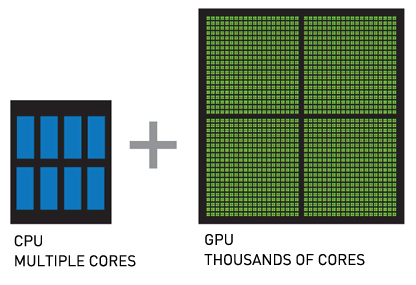
CPUs are designed as general-purpose processors capable of efficiently performing various tasks. Due to their complex control logic and large cache sizes, they excel in tasks requiring single-thread performance. A typical CPU contains a few cores (ranging from 4 to 64 in modern high-end servers), each capable of executing multiple instructions per cycle, which is ideal for processes requiring high precision on a diverse set of operations.
A CPU is the brain of any computer or server. Any dedicated server or bare metal server will come with physical CPUs to perform the basic processing of the operating system. Cloud VPSs have virtual cores allocated from a physical chip.
CPUs vs. GPSs — how is a CPU different from a GPU?
Historically, if you have a task that requires a lot of processing power, you add more CPU power instead of adding a graphics card with GPUs and allocate more processor clock cycles to the tasks that need to happen faster.
Many basic servers come with 2 to 8 cores, and some powerful servers have 32, 64, or even more processing cores. In terms of GPU vs. CPU speed, CPU cores have a higher clock speed, usually in the range of 2-4 GHz. CPU clock speed is a fundamental difference that needs to be considered when comparing a processor vs. a graphics card.
GPUs are parallel processing monsters
Originally designed for rendering graphics, GPUs contain thousands of smaller, simpler cores designed for parallel processing. This architecture allows GPUs to handle multiple tasks simultaneously, making them extremely efficient for operations that can be performed in parallel. While a CPU might excel at sequential tasks, a GPU’s architecture shines in scenarios requiring massive parallelism.
A GPU is a type of processor chip specially designed for use on a graphics card. GPUs that are not used specifically for drawing on a computer screen, such as those in a server, are sometimes called General Purpose GPUs (GPGPU).
GPUs vs. CPUs — how is a GPU different from a CPU?
The clock speed of a GPU may be lower than modern CPUs, but the number of cores on each chip is much denser. This is one of the most distinct differences between a graphics card vs. CPU. This allows a GPU to perform a lot of basic tasks at the same time.
In its intended original purpose, this has meant calculating the position of hundreds of thousands of polygons simultaneously and determining reflections to quickly render a single shaded image via efficient shader cores for, say, a video game. Additionally, core speed on graphic cards is steadily increasing, but generally lower in terms of GPU vs. CPU performance.
Why can’t the entire operating system run on the GPU?
There are some restrictions when it comes to using a graphics card vs. CPU. One of the major restrictions is that all the cores in a GPU are designed to only process the same operation at once, referred to as Single Instruction Multiple Data (SIMD).
So, if you are making 1,000 individual similar calculations, like cracking a password hash, a GPU can work great by executing each one as a thread on its own core with the same instructions. However, using the graphics card vs. CPU for kernel operations (like writing files to a disk, opening new index pointers, or controlling system states) would be much slower.
GPUs have more operational latency because of their lower speed, and the fact that there is more “computer” between them and the memory compared to the CPU. The transport and reaction times of the CPU are lower and better since it is designed to be fast for single instructions.
By comparison to latency, GPUs are tuned for greater bandwidth, which is another reason they are suited for massive parallel processing. In terms of GPU vs. CPU performance, graphics cards weren’t designed to perform the quick individual calculations that CPUs are capable of. So, if you were generating a single password hash instead of cracking one, then the CPU will likely perform best.
Can GPUs and CPU work together?
There isn’t exactly a switch on your system you can turn on to have, for instance, 10% of all computation go to the graphics card. In parallel processing situations, where commands could potentially be offloaded to the GPU for calculation, the instructions to do so must be hard-coded into the program that needs the work performed.
Luckily, graphics card manufacturers like NVIDIA and open-source developers provide free NVIDIA CUDA-X Libraries for use in common coding languages like C++ or Python that developers can use to have their applications leverage GPU processing where it is available.
AI workloads and the reign of GPUs
Artificial intelligence, in particular machine learning (ML) and deep learning, has revolutionized numerous industries. Deep learning’s core component, neural network training, involves performing millions of matrix multiplications — a task well-suited to GPUs’ parallel architecture.
Training neural networks
Training a deep neural network involves adjusting millions of parameters through techniques such as backpropagation. Backpropagation in neural networks is a method used to train neural networks, like how you might teach a child by correcting mistakes. Here’s how it works:
- Forward Pass. Data goes through the network, layer by layer until it produces an output. This output is compared to the actual answer, and the difference (error) is calculated.
- Backward Pass. The network then works backward to determine how much each connection (weight) contributed to the error. It adjusts these weights slightly to reduce the error. This process is repeated many times, gradually improving the network’s accuracy.
This process is computationally intensive and involves a significant number of parallelizable tasks. GPUs can handle these operations concurrently across their thousands of cores, drastically reducing the time required for training.
For instance, NVIDIA’s Tesla and AMD’s Radeon Instinct series are designed for AI and deep learning tasks. These GPUs provide massive computational power, significantly accelerating the training processes compared to CPUs.
GPU hosting for heavy-duty workloads
Get ultimate processing power that you can rely on with Liquid Web.
Inference — a more balanced field
While GPUs dominate in training, inference — the process of making predictions using a trained model — can be effectively handled by both CPUs and GPUs, depending on the specific requirements. CPUs can be more advantageous for real-time inference where latency is critical due to their superior single-thread performance and lower latency. However, GPUs still hold a significant edge for batch-processing inference tasks.
Software ecosystem
The AI ecosystem is also heavily optimized for GPUs. Frameworks like TensorFlow, PyTorch, and Compute Unified Device Architecture (CUDA) are tailored to leverage GPUs’ parallel processing power. These kinds of frameworks provide libraries and tools that make it easier for developers to optimize and deploy models on GPU hardware, further cementing GPUs’ dominance in AI.
Web hosting platforms — the domain of CPUs
Web hosting platforms, the backbone of the internet, have traditionally relied on CPUs due to their ability to do a wide range of tasks simultaneously.
Handling diverse workloads
Web servers manage many tasks, including processing HTTP requests, running application logic, and interacting with databases. These tasks may require high single-thread performance and the ability to handle varied, often unpredictable workloads — areas where CPUs excel. For instance, serving dynamic web content involves executing server-side scripts (for example, PHP, Python, Ruby), which benefit from the CPU’s ability to switch between tasks and handle complex logic quickly.
Virtualization and containerization
Modern web hosting relies heavily on virtualization and containerization technologies like VMware, Kernel-Based Virtual Machine (KVM), Docker, and Kubernetes. These technologies create isolated environments for running applications, allowing better resource utilization and scalability. CPUs, with their robust support for virtualization and advanced instruction sets, are well-suited for these tasks. They provide the necessary capabilities to manage virtual machines (VMs) and containers efficiently, ensuring that resources are allocated and used effectively.
Scalability and redundancy
CPUs also play a critical role in scaling web applications. Load balancers, for example, which distribute incoming web traffic across multiple servers, require high single-thread performance to manage network traffic and ensure low latency efficiently. Additionally, web hosting platforms often use CPUs to handle redundancy and failover mechanisms, providing high availability and reliability of web services.
Edge computing
Edge computing, which takes data storage and computation closer to the location where it is required, often relies on CPUs. This dependency is because edge devices, which range from routers to dedicated edge servers, require versatile processing capabilities to handle various tasks locally. Their general-purpose architecture makes CPUs better suited for these heterogeneous and often latency-sensitive workloads.
Synergistic potential — combining CPUs and GPUs
While GPUs and CPUs each have distinct advantages, the most potent systems often combine both strengths. This synergy is evident in many advanced computing scenarios, including AI and high-performance web hosting platforms.
AI and ML infrastructures
In AI and ML infrastructures, CPUs and GPUs work together to optimize performance. CPUs orchestrate tasks, preprocess data, and feed data to GPUs for heavy parallel computations. Once the GPUs process the data, the CPUs can handle the final stages of analysis and decision-making, leveraging their superior single-thread performance.
Hybrid cloud solutions
In the cloud computing landscape, hybrid solutions that leverage both CPUs and GPUs are becoming increasingly popular. Cloud service providers like AWS, Google Cloud, and Microsoft Azure offer instances that combine GPUs’ computational power with CPUs’ versatility. These instances are ideal for applications requiring intensive computation and general-purpose processing, such as AI-driven web services, real-time analytics, and complex simulations.
Container orchestration with GPU support
With the popularity of container orchestration platforms, including Kubernetes and similar technologies, there is an increasing trend towards supporting GPUs within containerized environments. This support allows developers to deploy AI workloads seamlessly within the same infrastructure used for web hosting, leveraging GPUs for computation-intensive tasks while relying on CPUs for general processing and orchestration.
The future — emerging trends and technologies
As technology evolves, the lines between CPU and GPU capabilities become increasingly blurred. Innovations in hardware and software are driving new ways to harness the strengths of both processors.
AI-optimized CPUs
Manufacturers are developing AI-optimized CPUs with enhanced parallel processing capabilities. For example, Intel’s Xeon processors with built-in AI acceleration features aim to bridge the gap, providing better performance for AI inference tasks while maintaining the versatility of traditional CPUs.
GPUDirect and unified memory
Technologies like NVIDIA’s GPUDirect and unified memory architectures are improving data transfer efficiency between CPUs and GPUs. These advancements reduce latency and increase bandwidth, allowing seamless integration and faster processing times for AI and complex computational tasks.
FPGA and ASIC integration
Application-Specific Integrated Circuits (ASICs) and Field-Programmable Gate Arrays (FPGAs) also enter the scene, providing specialized hardware for specific tasks. These can be used alongside CPUs and GPUs to optimize performance for particular applications, such as deep learning inference or high-frequency trading.
Quantum computing
Still in its early life, quantum computing has the potential to revolutionize computational capabilities. Able to perform complex calculations at accelerated speeds, quantum processors could complement traditional CPUs and GPUs, particularly in areas like cryptography, optimization, and AI.
Real-world scenarios where GPUs are powerful
So earlier in this post we posed the following question:
Do you need a graphics card for a web server? If so, why?
For those now wondering what the answer to our question is, it all depends. In most cases, your server doesn’t have a monitor. But graphics cards can be applied to tasks other than drawing on a screen. The application of GPUs in computing is for any intense general-purpose mathematical processing. Here are some classic examples:
- Protein chain folding and element modeling
- Climate simulations, such as seismic processing or hurricane predictions
- Plasma physics
- Structural analysis
- Deep machine learning for AI.
One of the more famous uses for graphics cards vs CPU is mining for cryptocurrencies, like Bitcoin.

This essentially performs a lot of floating point operations to decrypt a block of pending transactions. The first machine to find the correct solution, verified by other miners, gets bitcoins (but only after the list of transactions has grown a certain amount). Graphics cards are perfect for performing a lot of FLOPS (floating point operations per second), which is what is required for effective mining for cryptocurrencies,
Graphical applications where GPUs are ideal
GPUs, as we saw earlier, are really great at performing lots of calculations to size, locate, and draw polygons. So, naturally, one of the tasks they excel at is generating graphics. Here are some examples and use cases:
- CAD rendering and fluid dynamics
- 3D modeling and animation
- Geospatial visualization
- Video editing and processing
- Image classification and recognition
Another sector that has greatly benefited from the trend of GPUs in servers is finance or stock market strategy Here are the types of analysis where GPUs may be of great benefit:
- Portfolio risk analysis
- Market trending
- Big data exploration
- Pricing and valuation
Numerous other applications exist in which GPUs are ideal for use:
- Medical image computing
- Speech-to-text and voice processing
- Relational databases and parallel queries
- End-user deep learning and marketing strategy development
- Identifying defects in manufactured parts through image recognition
- Password recovery (hash cracking)
This is just the “tip of the iceberg” in terms of what GPUs can do for you. NVIDIA publishes a list of applications that have GPU accelerated processing. This industry is only bound to expand over the years ahead.
When analyzing CPU vs GPU they are both valuable
The debate between GPUs vs. CPUs is not about which is superior overall, but which is better suited for specific tasks. In AI, GPUs dominate due to their superior parallel processing functionality, making them excellent for training deep learning models. Conversely, CPUs remain the backbone of web hosting platforms, providing the versatility and single-thread performance needed to handle diverse and dynamic workloads.
The future of computing lies in the harmonious integration of CPUs and GPUs rather than in a battle of GPUs vs. CPUs, because they both have value. Leveraging the strengths of each to tackle increasingly complex and varied computational challenges is the key to success.
As technology progresses, hybrid solutions that combine the power of CPUs, GPUs, and emerging technologies will drive the next wave of innovation. They are capable of propelling both AI and web hosting platforms to new heights of performance and efficiency.
Do your application servers used for AI, machine learning, or large language models (LLMs) need a GPU? Our latest article explores this crucial question, offering insights to guide your decision. We’ve got you covered if you want to optimize your server for peak performance.
GPUs do not come on dedicated servers at Liquid Web by default, since they are very application specific. However, if you know you have a need for intense GPU-based computing, we do offer a number of GPU hosting options for your project.
Are you ready to enhance your server capabilities? Feel free to request a custom build from our hosting experts today and unlock the true potential of your AI projects!